Keep your Shopify sections in sync automatically

Make a change once and Section Link updates every matching section for you. No more repeat edits before a launch.

Why merchants choose Section Link

Ditch manual theme updates. Give your team a dependable workflow that keeps every customer-facing moment aligned without sacrificing creative freedom.

Effortless storefront updates

Edit one section once and watch it update everywhere. Perfect for shared headers, featured collections, and promotional blocks across multiple templates.

  • 1Instant synchronization across linked sections
  • 2Works with modern Shopify themes out of the box
  • 3Smart safeguards that prevent partial saves

Reliable guardrails

Section Link lines up changes so live pages never end up half-updated, even when multiple teammates are working.

  • 1Automatically checks sections match before syncing
  • 2Simple summaries tell you what changed
  • 3Automatic background sync with easy pause controls

Team-friendly workflows

Agencies and in-house teams work from the same source of truth. Preview updates before they hit your store.

  • 1Friendly reminders keep unsaved edits from slipping through
  • 2Invite collaborators directly from your store
  • 3Team permissions keep work safe

How Section Link keeps campaigns moving

Three guided steps help merchants deploy consistent creative in minutes, not hours.

Step 1

Create a sync group

Pick your theme, choose the main section, and select which matching sections should stay in sync.

Step 2

Customize once

Edit the base section as usual—Section Link captures every change, including copy, media, and settings.

Step 3

Publish with confidence

Push changes when you are ready or let automatic background runs keep things aligned every hour.

Purpose-built to support every launch

Support seasonal campaigns, product drops, and evergreen stories with tools that match Shopify best practices.

  • Shopify-style interface your team already knows
  • Clear in-app messages show what happened and what to do next
  • Plain-language history of every section updated or skipped
  • One-click reruns during busy launches

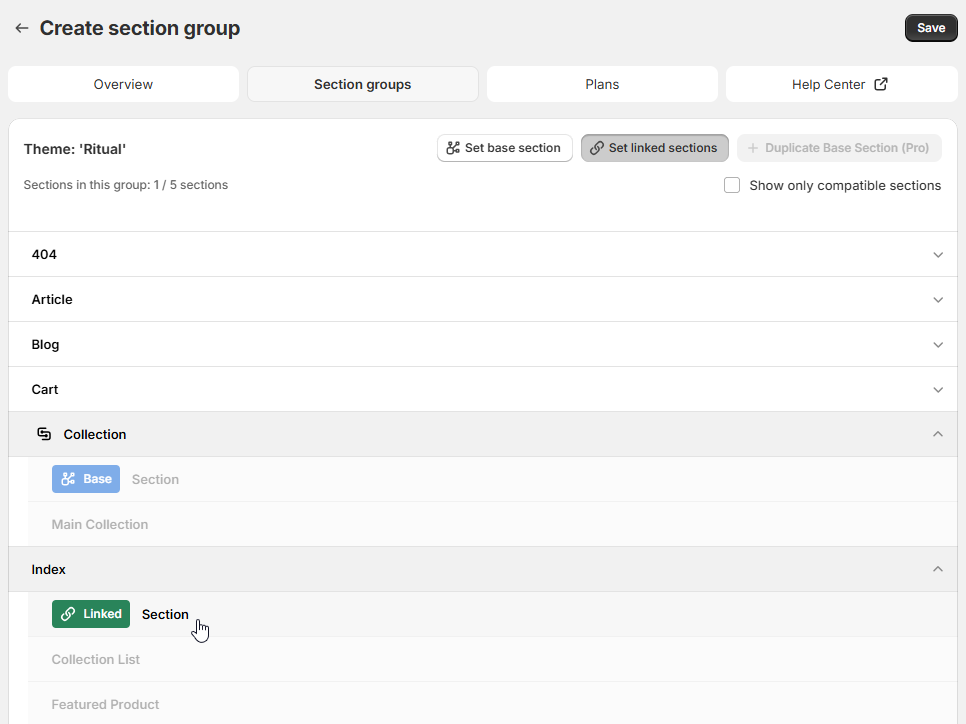
The Editor

Highlight linked sections, track unsaved changes, and prompt for a group name before launch.

Section Link editor with linked sections highlighted

Your storefront workflow, simplified

See the complete journey from install to ongoing optimization.

1. Connect your store

Install Section Link, choose the theme you want to tidy up, and we will suggest sections that belong together.

2. Link matching sections

Pick a base section and connect the matching ones. We only let you link sections that fit, so nothing breaks.

3. Launch campaigns

Push edits live immediately or schedule syncs around key product drops. Section Link keeps things tidy in the background.

4. Monitor results

See a quick report after each sync and rerun it anytime.

Simple pricing that scales with your storefront

Every plan comes with guided onboarding, responsive support, and reliable sync performance.

Free

Perfect for new stores keeping a few high-impact templates aligned.

$0 / month

  • Up to 5 sync groups
  • Maximum 5 sections per group
  • Manual sync trigger
Start for free
Most popular

Pro

Grow confidently with flexible campaigns and unlimited team collaboration.

$14.99 / month

  • Up to 20 sync groups
  • Maximum 20 sections per group
  • Automatic hourly sync
Try Pro

Enterprise

For multi-store brands and agencies managing high-volume content programs.

$49.99 / month

  • Up to 50 sync groups
  • Maximum 100 sections per group
  • Automatic hourly sync
Subscribe to Enterprise

Frequently asked questions

Everything you need to know before installing Section Link.

Does Section Link work with Online Store 2.0 themes?

Section Link supports all Online Store 2.0 themes, including custom sections. If your theme is Online Store 2.0, you are ready to sync.

Will Section Link overwrite content I do not want to change?

No. You choose the base section and the sections to sync. We only update fields the sections share, and we show you exactly what changed after every sync.

Can I pause automatic syncs during big launches?

Yes. Pause any sync group temporarily and resume with a single click. You can also trigger manual syncs whenever you are ready.

How does billing work if I manage multiple stores?

Each store has its own plan. If you manage multiple stores, reach out and we will help you choose the right setup.

What happens if I uninstall the app?

Section Link removes your stored data and stops all background syncs immediately. Reinstall anytime to pick up where you left off.

Need a hand? We are here for you.

Open the Help Scout Beacon for live chat, guided walkthroughs, and quick answers. Shopify-focused support keeps your workflow moving.